Your best people's know-how. On every desk, every day.

Intelli.Build captures what your catalogs, systems and most experienced people know, and turns it into one company brain your whole team can ask. New hires get productive faster. Senior staff stop getting interrupted. And nothing walks out the door when someone retires.

Distributor Assistant
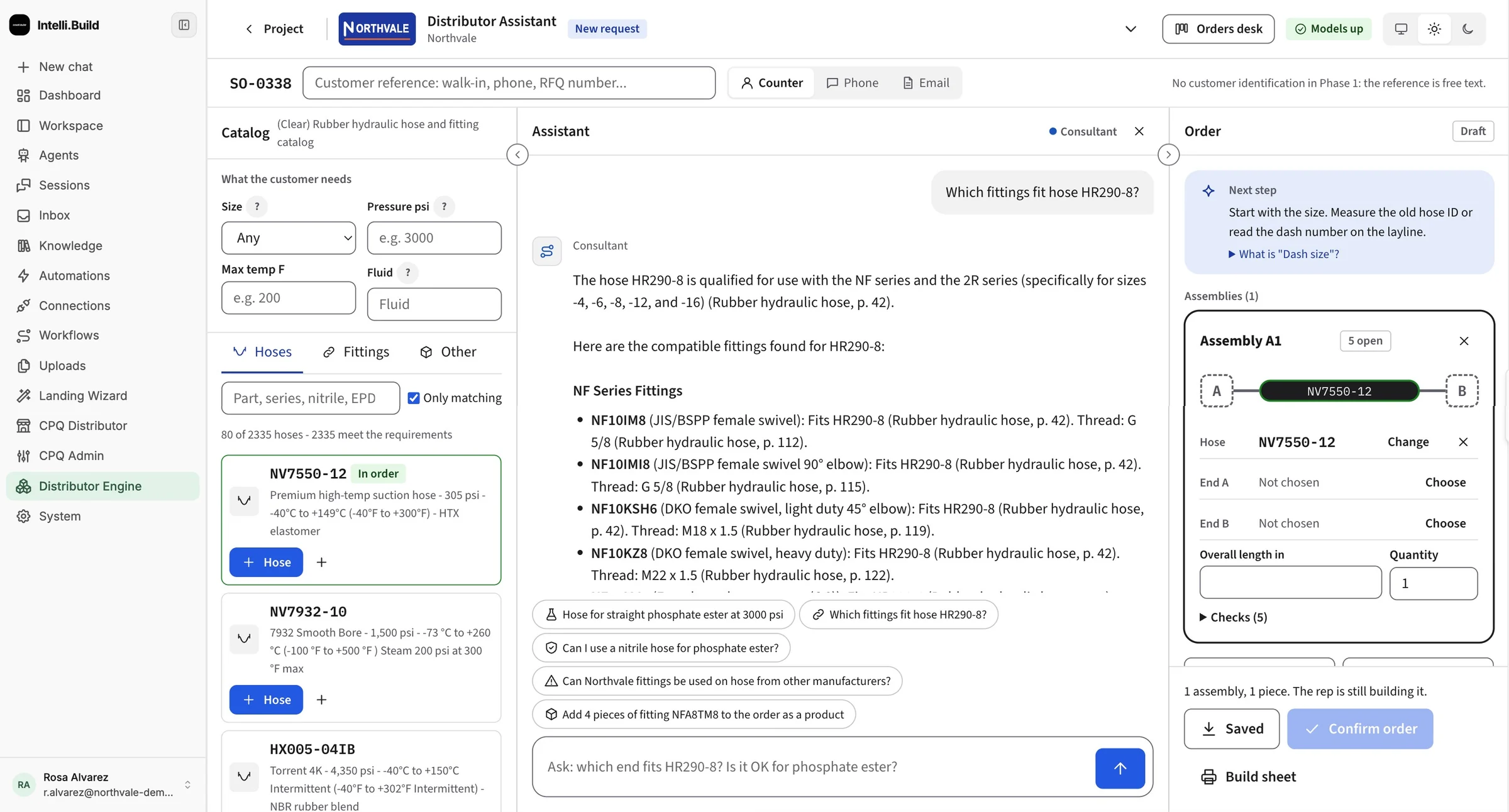
Intelli.Build assistant answering which fittings fit a hose, listing compatible parts with thread types and catalog page citations, next to the order being built

The knowledge that runs your business is about to retire

Nothing is missing. The ERP knows what was ordered, the catalog knows what fits, and your veterans know the rest. None of it is joined up, so the answer keeps being a person.

The 40-year veteran

Knows every edge case, every customer quirk, every part that's "basically the same." When they retire, it goes with them.

The interrupted senior

Every tough question routes to the same three people. Their real work waits while they answer the same things again.

The long ramp

New reps need months before they quote with confidence. Until then, they're expensive, nervous and leaning on everyone else.

The scattered truth

Catalogs in PDFs, orders in the ERP, customers in the CRM, decisions in inboxes. Most AI tools stall at the first integration.

One brain that knows what your company knows

If you have it, Intelli.Build can learn from it. Load it once, and every team works from the same answers.

Everything you already have

  • PDF catalogs
  • ERP orders and stock
  • CRM and HubSpot
  • Email and Gmail
  • Call transcripts
  • CAD and DXF drawings
  • Spreadsheets and price files
  • SOPs and guides
  • Your senior rep's last-day interview

Intelli.Build

Your company brain

What your teams get back

  • AnswersWith the part, the spec and the source page
  • OrdersChecked against your rules before they ship
  • DraftsOf emails and quotes, approved by a person
  • AlertsWhen an account goes quiet or a quote stalls
  • TrainingThat works on day one, from your own know-how

Built for everyone who touches an order

Same brain, different jobs. Each team gets the answers and the help it needs, without another login to learn.

The assistant answering a parts question with catalog page citations
New hires and training

Productive in weeks, not years

  • Ask anything, any time, and see the source
  • Learn your products the way your veterans explain them
  • Less hand-holding from senior staff
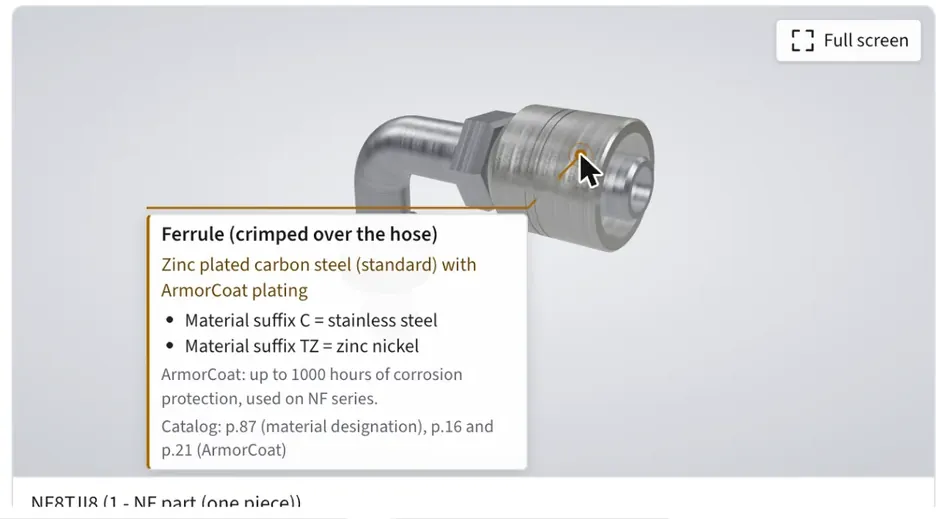
3D fitting with a callout listing its material, plating and catalog pages
Sales reps

Quote with confidence

  • Right part and spec in seconds, at the counter or in the field
  • Pre-call briefs and follow-up drafts
  • Never lose a deal to "let me get back to you"
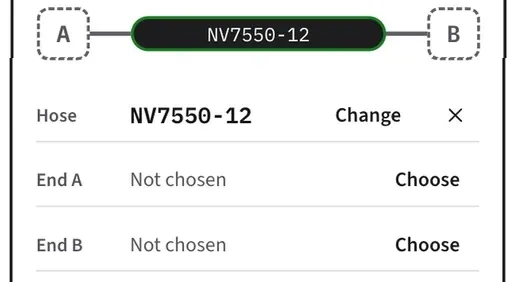
An assembly being built, with ends still to be chosen and checks open
Back office and service

Fewer re-checks and returns

  • Orders checked by code before the shop sees them
  • Technical questions answered without escalating
  • Catalog updates loaded once, used everywhere
Leadership view · this weekIllustrative
Most askedFittings for HR290-8 hose42 questions
Quotes stalledOpen more than 3 days6
Gone quietHalvorsen Supply41 days
Leadership

See the business clearly

  • What customers ask for, and what goes unanswered
  • Where quotes stall and which accounts went quiet
  • Know-how that stays when people move on

Real screens from a real catalog

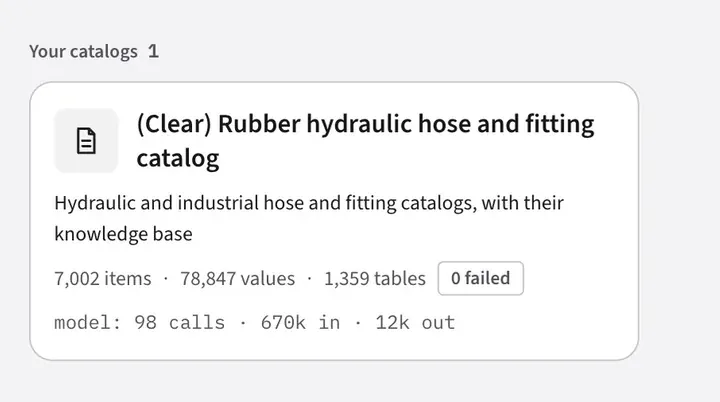
One demo build on a hydraulic hose and fitting catalog set: 3 catalogs, 869 pages, 1,359 tables and 7,002 products, structured with zero failed items.

01 · Ask it anything

The answer your best rep would give, in seconds, in 3D

Anyone on the team asks in plain language, the way the customer asked. The assistant answers only from your catalogs and documents, and code checks every part number and value before it's shown.

  • Every answer cites its pageReps can show the customer the source
  • One click adds the partTo the order or the assembly
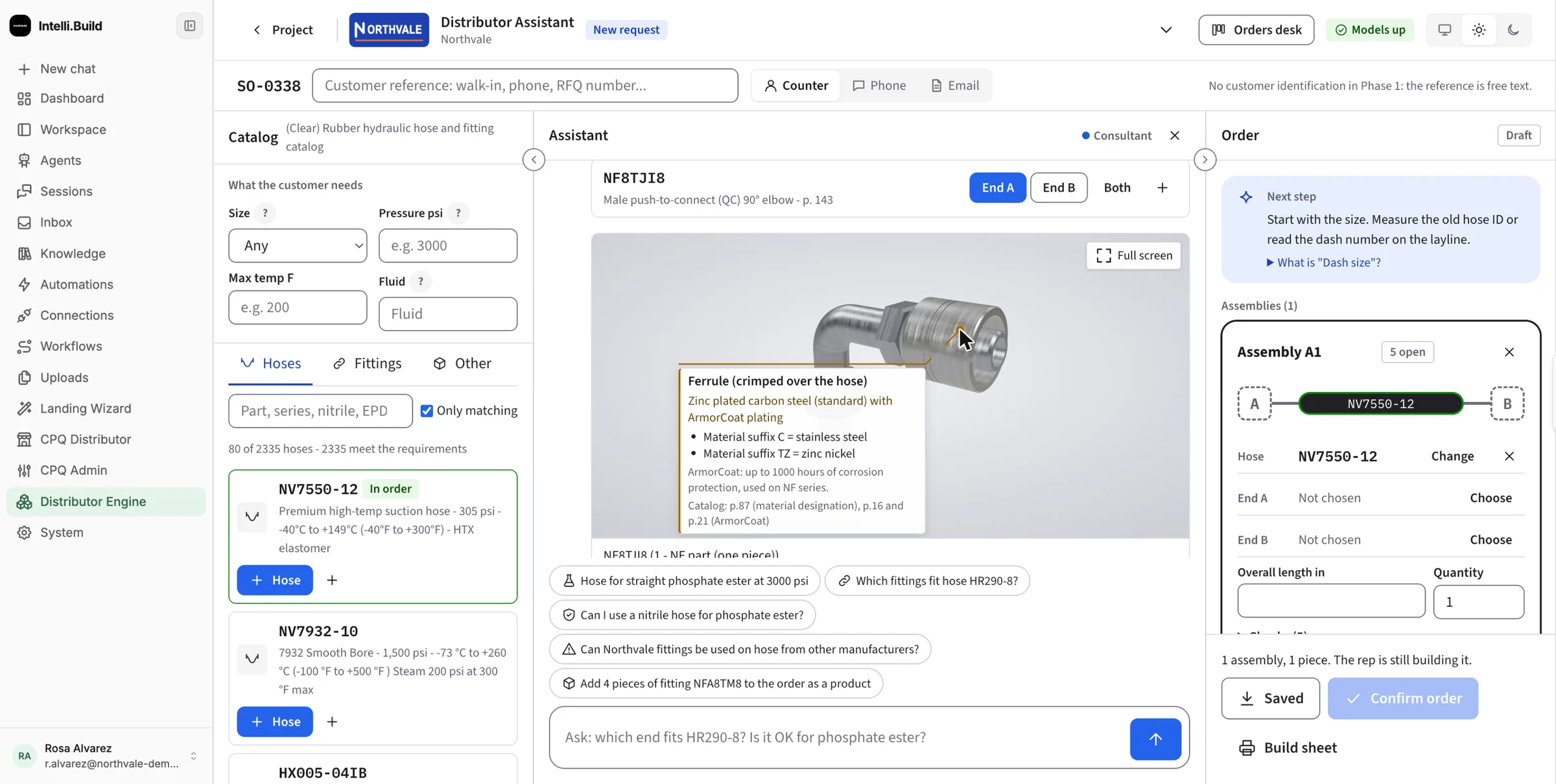
  • See the part in 3DDrawn from your catalog with real dimensions. Point at any feature to see what it is and where it's documented
  • Hard questions handledFluid compatibility, pressure, temperature and cross-references
Assistant · 3D model
The assistant showing a 3D model of a fitting; hovering the ferrule opens a callout with its material, plating options and catalog page references
02 · Load it once

Hundreds of catalog pages become one source of truth

Drop in your PDFs. Intelli.Build reads every page, finds the tables, double-checks them and builds a connected map of your products: what fits what, which tools crimp which variants, and where it all came from.

  • Hours per catalogNot months of manual mapping
  • Every fact keeps its source page
  • New edition? Run it again and everyone's current
Sources
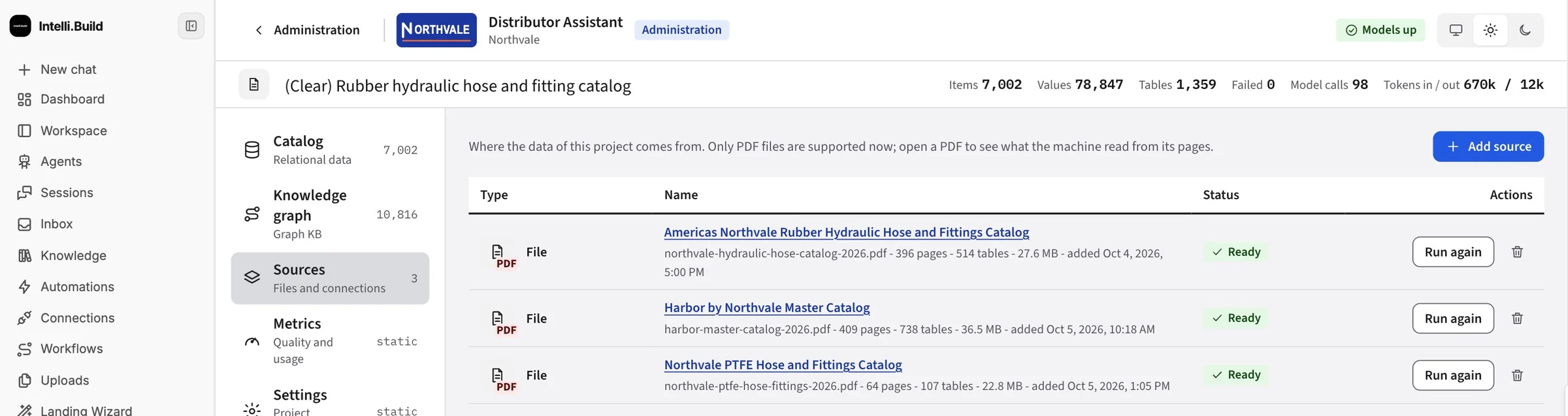
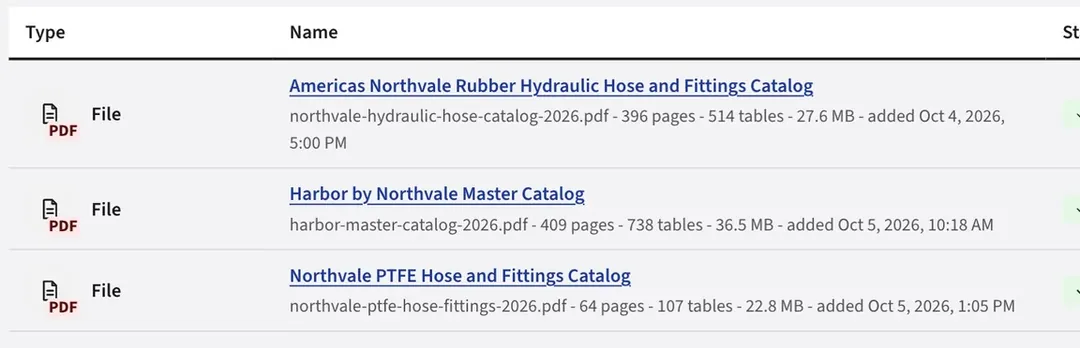
Three catalog PDFs processed and ready, with page and table counts
Knowledge graph
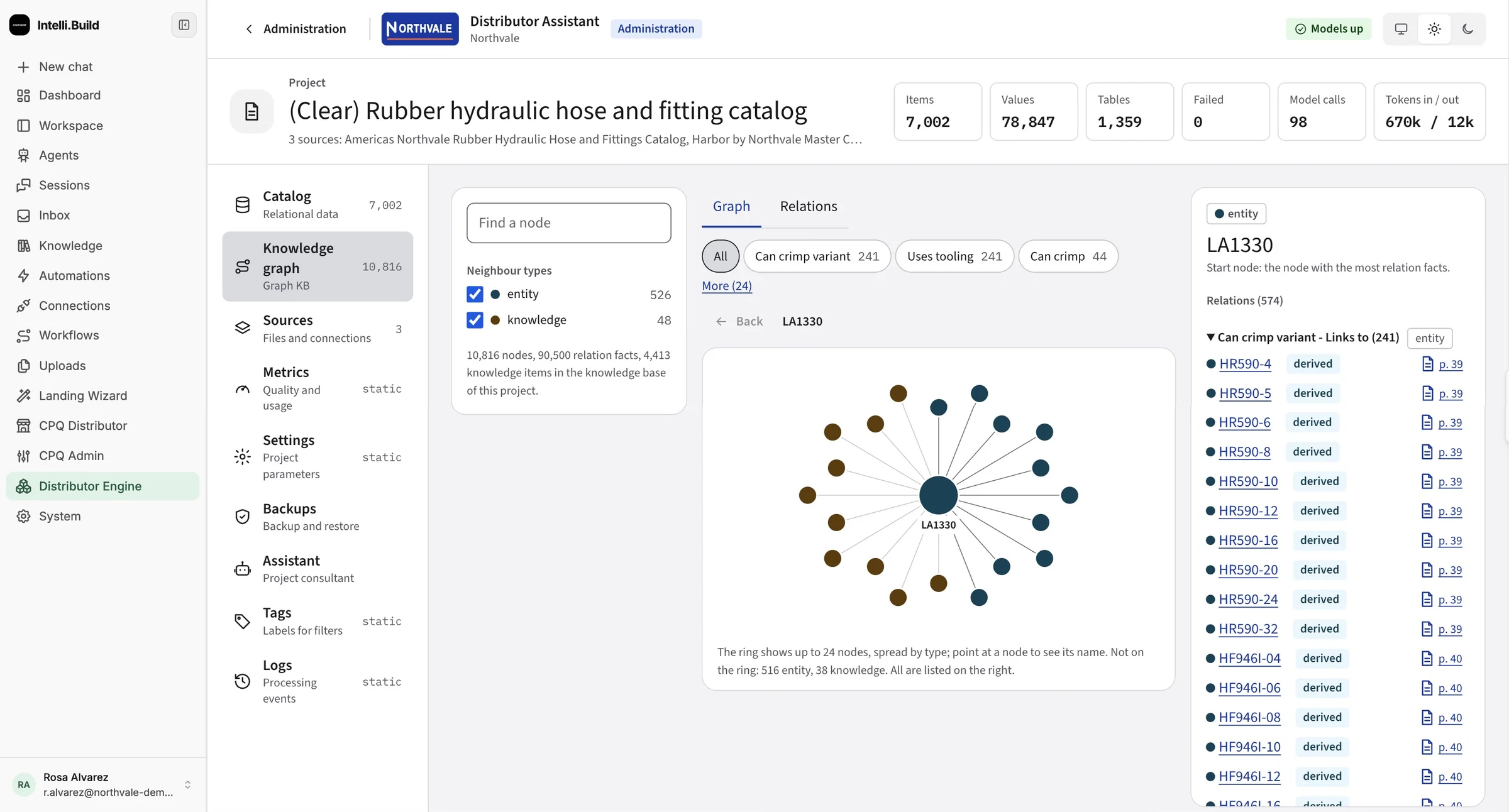
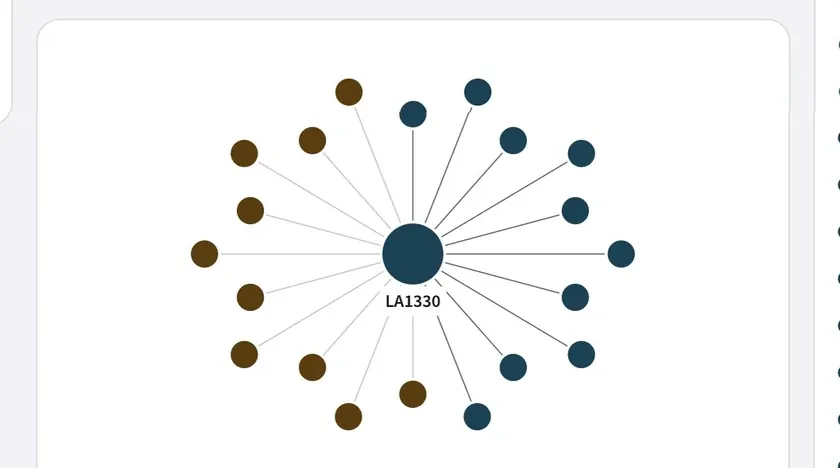
Knowledge graph with 10,816 nodes and a tooling node linked to 241 hose variants, each with a page citation
03 · Rules and roles

Your rules, enforced on every order. Every product line, every rep.

Set preferred series, selection guards and who sees what once, for every product line. Assemblies are checked as they're built.

  • Shared rulesAcross projects, vendors and product lines
  • Users and rolesThat control who sees what
Administration
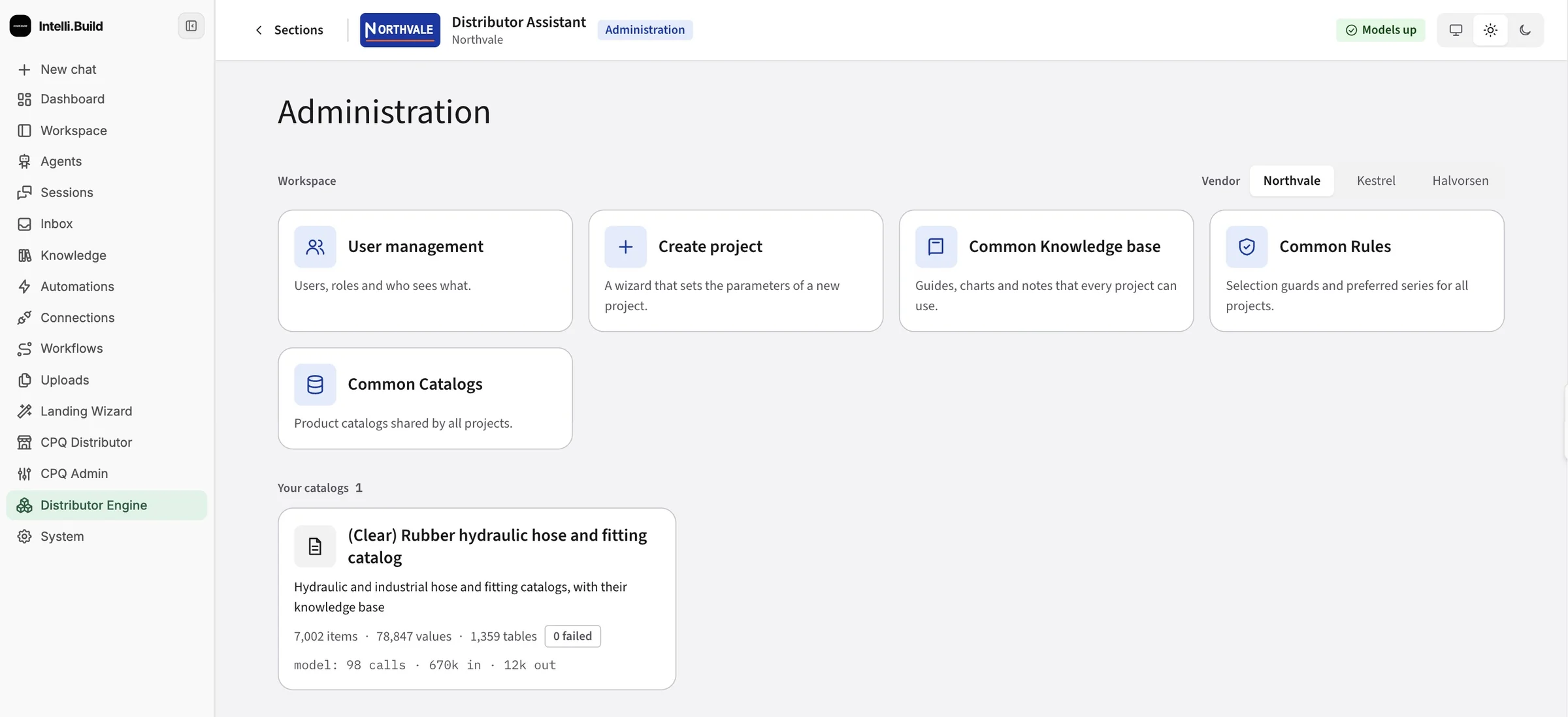
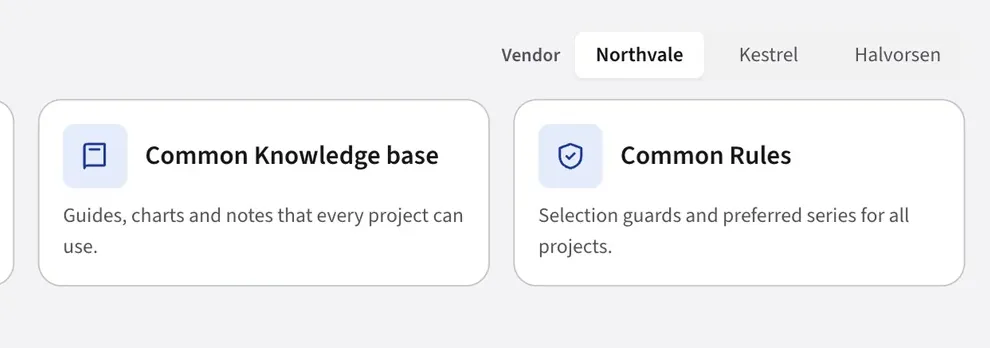
Administration workspace with user management, common rules, common knowledge base, catalogs and a vendor switch

Not a chatbot. The system your operation runs on.

The catalog brain is where it starts. Everything after it plugs into the same foundation. Connections bring in the systems you already run. The assistant works across all of them for each person. And a daily brief puts what needs a decision in front of them every morning, so nothing goes out until a person approves it.

Connections

Connect what you already run. Agents read and act through it.

HSHubSpotConnected
GMGmailConnected
GCGoogle CalendarConnect
GDGoogle DriveConnect
SLSlackConnect
JIJira · ConfluenceConnect
FFCall transcriptsConnected
WHERP via webhookConnect
MCPClaude · CopilotConnected
Assistant
Hi. What can you help me with today?
AssistantGood morning, Rosa. A few things are waiting for you:
  • 3 quote requests came in overnight. I matched the parts and drafted replies for your approval.
  • Halvorsen Supply hasn't ordered in 41 days. Want a check-in email?
  • The new Northvale catalog edition finished loading. 212 parts changed.
Draft the check-in for Halvorsen.
AssistantDone. It's in your daily brief for review. Nothing is sent until you approve it.
Daily brief · Needs your decision
Email draftCheck-in: Halvorsen Supply

Hi Dana, it's been a few weeks. Your usual -12 assemblies are in stock and ready to ship this week…

Approve and sendEdit
QuoteRFQ from Kestrel Rigging · 6 lines

All parts matched and checked. One line needs a pressure rating confirmed.

ReviewAssign
AlertOrder SO-0338 has 2 open checks

Working pressure and temperature not yet confirmed with the customer.

Open order

Illustrative views. Names and messages are examples.

Shared knowledge base and rules, with a switch between three vendors

60+ modules out of the box

Knowledge bases, CRM, workflows, inbox, scheduling, connectors. Install what you need.

A processed catalog: 7,002 items, 78,847 values, 1,359 tables, 0 failed

Build your own, in hours

Point Claude Code, Copilot or Cursor at the platform over MCP. What you build lands next to your real data.

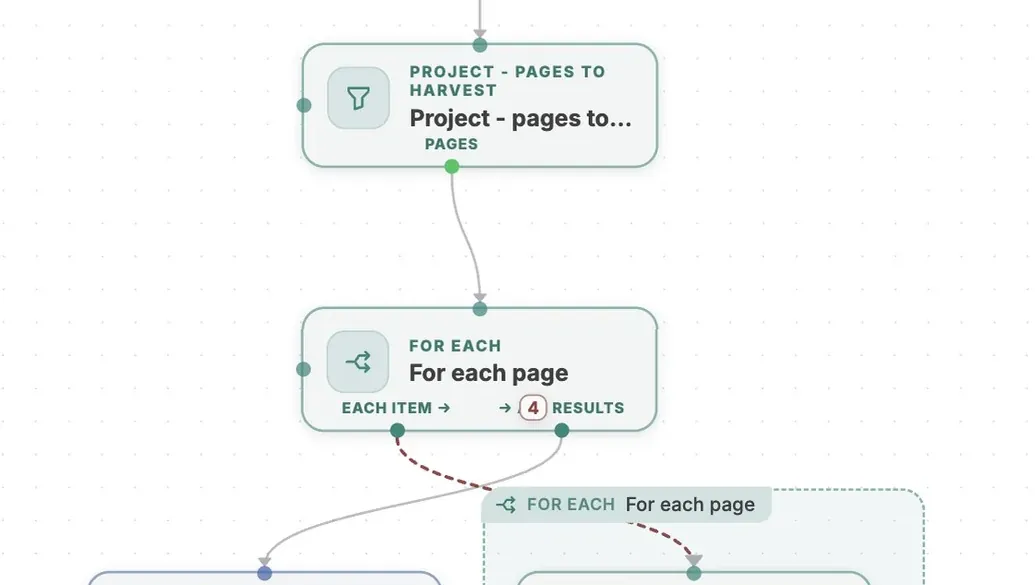
Workflow steps that harvest catalog pages one by one

Workflows without the plumbing

Visual workflows with AI steps built in. No separate automation tool to buy.

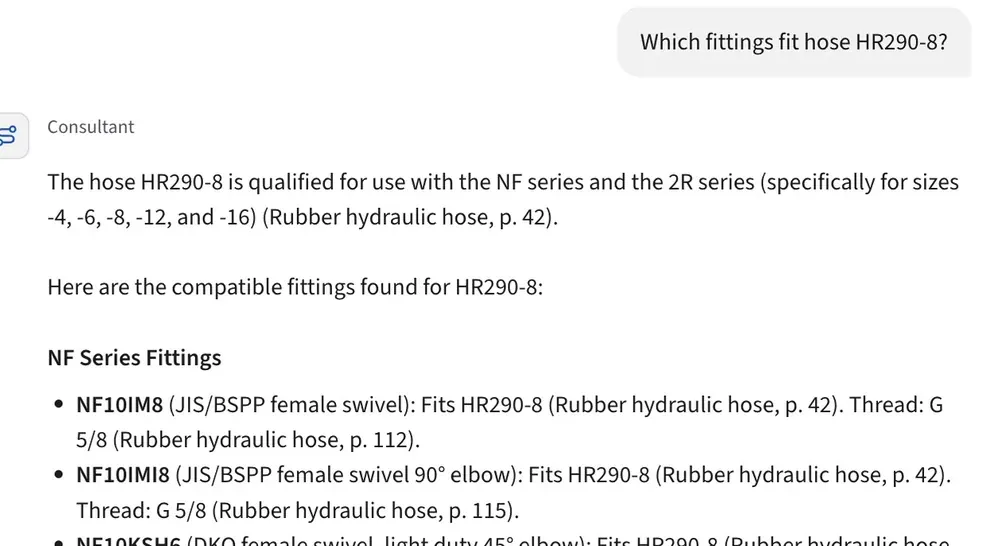
The assistant answering which fittings fit a hose, citing catalog pages

Assistants that know your business

Personal assistants for each person, plus agents that research, draft and follow up.

Your process, as a workflow you can see

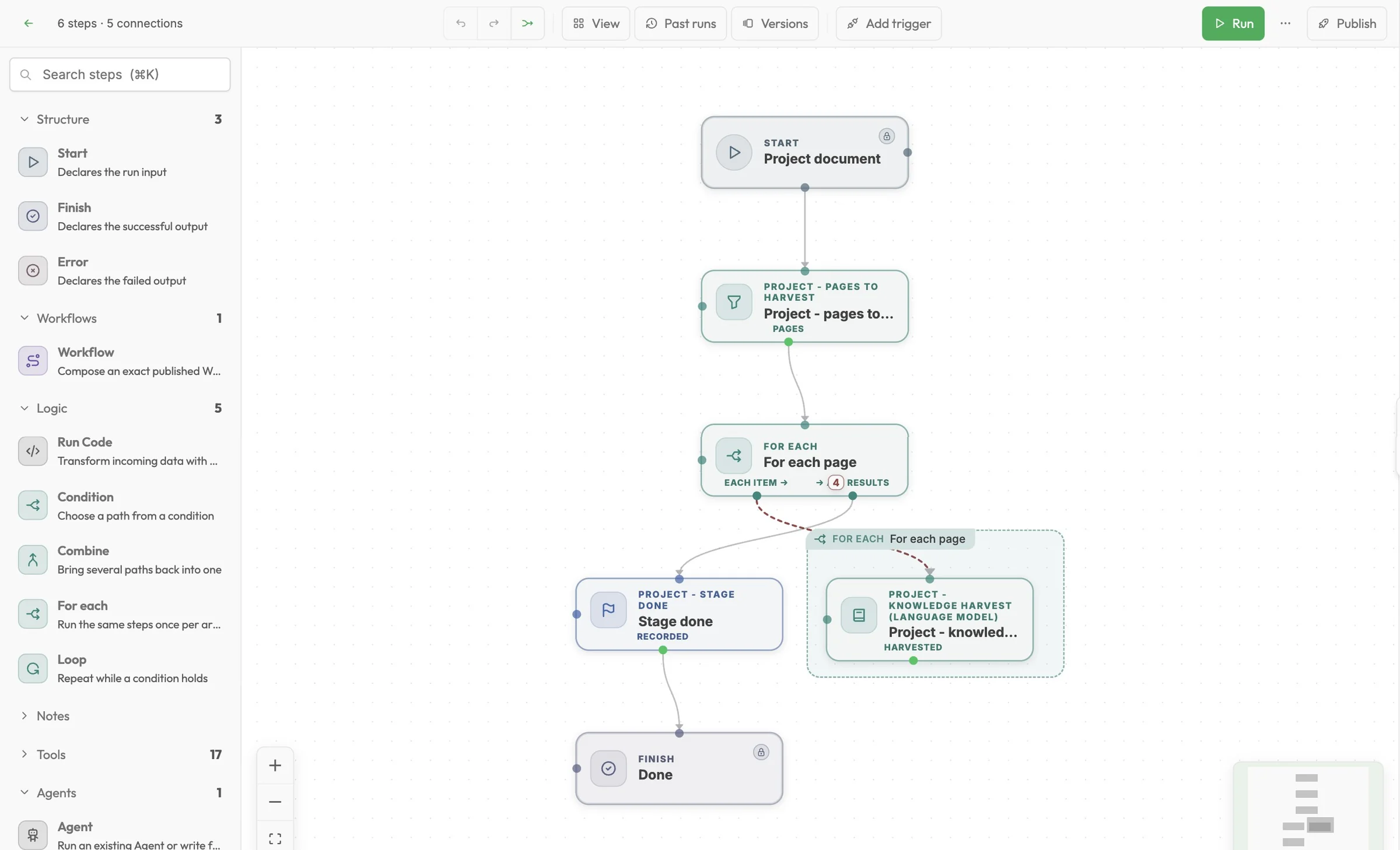
Catalog ingestion itself runs as a workflow on the platform. The same building blocks automate quoting, follow-ups, re-orders and ERP syncs.

Workflows
Visual workflow builder showing a catalog harvesting workflow with a for-each loop and a language model step

Your data, your rules, a record of everything

AI that touches customers and orders has to be trusted by the people who run the business. These are the guardrails.

Your own instance

On your servers or your cloud. One company per copy, and nothing passes through anyone else's systems unless you choose it.

A person approves

Anything headed to a customer or supplier waits in the inbox. Nothing is sent on its own.

Permissions, every time

Each module can only touch what you allow, checked on every attempt, not once at setup.

Everything written down

What ran, for whom, against which record. Your team can audit it without asking us.

Not training data

Your data, your catalogs and your history are not used to train models.

Works with your AI tools

Keep Claude, Copilot or Cursor. They connect over MCP instead of being replaced.

From your files to a working brain

The heavy lifting is automated. Your team spends its time testing real questions, not mapping spreadsheets.

Three catalog PDFs listed with page and table counts, each marked Ready

Send us everything

Catalogs, price files, drawings, SOPs, even recorded conversations with your veterans.

Knowledge graph around one part, linked to the fittings that fit it

We build your brain

Pages, tables and relations are extracted and checked. Your rules and know-how go in alongside.

The assistant answering which fittings fit a hose, citing catalog pages

Your team tests it

Reps and back office run real customer questions. We tune it on the answers they flag.

An assembly being built from a hose and two ends

Go live and grow

Add CRM, email, ERP and your own workflows as each team is ready.

Run it for your team, or your whole network

Manufacturers

Give every distributor your best application engineer

Publish your catalogs as a branded brain across your distributor network. Every location quotes your parts correctly, with your rules built in.

  • Your brand, your rules, your catalogs
  • One update reaches every distributor
  • See what your network asks most
Distributors

Make every rep as good as your most senior one

Load the lines you carry, from one manufacturer or many, and give every team one place to ask, build and order.

  • Multiple vendors in one workspace
  • Orders checked before they reach the shop
  • CRM, email and workflows included

What buyers ask first

Will it make up part numbers?

No. It answers only from your catalogs and documents. Code checks every part number, value and rule against the structured catalog before anyone sees the answer, and each answer cites its source page.

Who on our team uses it?

New hires, sales reps at the counter and in the field, the back office, customer service and leadership. Each gets the view and the help their job needs.

What can we load?

PDF catalogs, spreadsheets, price files, SOPs, CAD and DXF drawings, emails and call transcripts. If you have it, we can usually load it.

Do we have to give up Claude or Copilot?

No. Intelli.Build works with them over MCP. Your team keeps the AI tools it likes, and those tools can query your company brain.

Where does our data live?

On an instance you own, on your servers or your cloud. Credentials for connected services stay in the connection and never enter agent prompts.

Does it replace our ERP or CRM?

No. It connects to them and fills the gaps between them. There's a built-in CRM with HubSpot sync if you want one.

Can we put our own brand on it?

Yes. Manufacturers and distributors can license Intelli.Build and run it under their own name, for their team or their whole network.

What does it take to get started?

A short call, your catalogs and a handful of real customer questions. We build the first version and test it with your team.

See your own catalog answer back

A 30-minute walkthrough with the team that built it. Bring a part number your counter struggles with, or a question only your veterans can answer.

  • The assistant live on a real hydraulic catalog
  • How your know-how, rules and systems fit in
  • What it takes to load your catalogs, and licensing options

Book your demo

Five fields. We reply to schedule.

We use your details only to arrange the demo.